In this post, I want to walk you through the architecture, design choices, and tech stack behind my public IP checker tool.
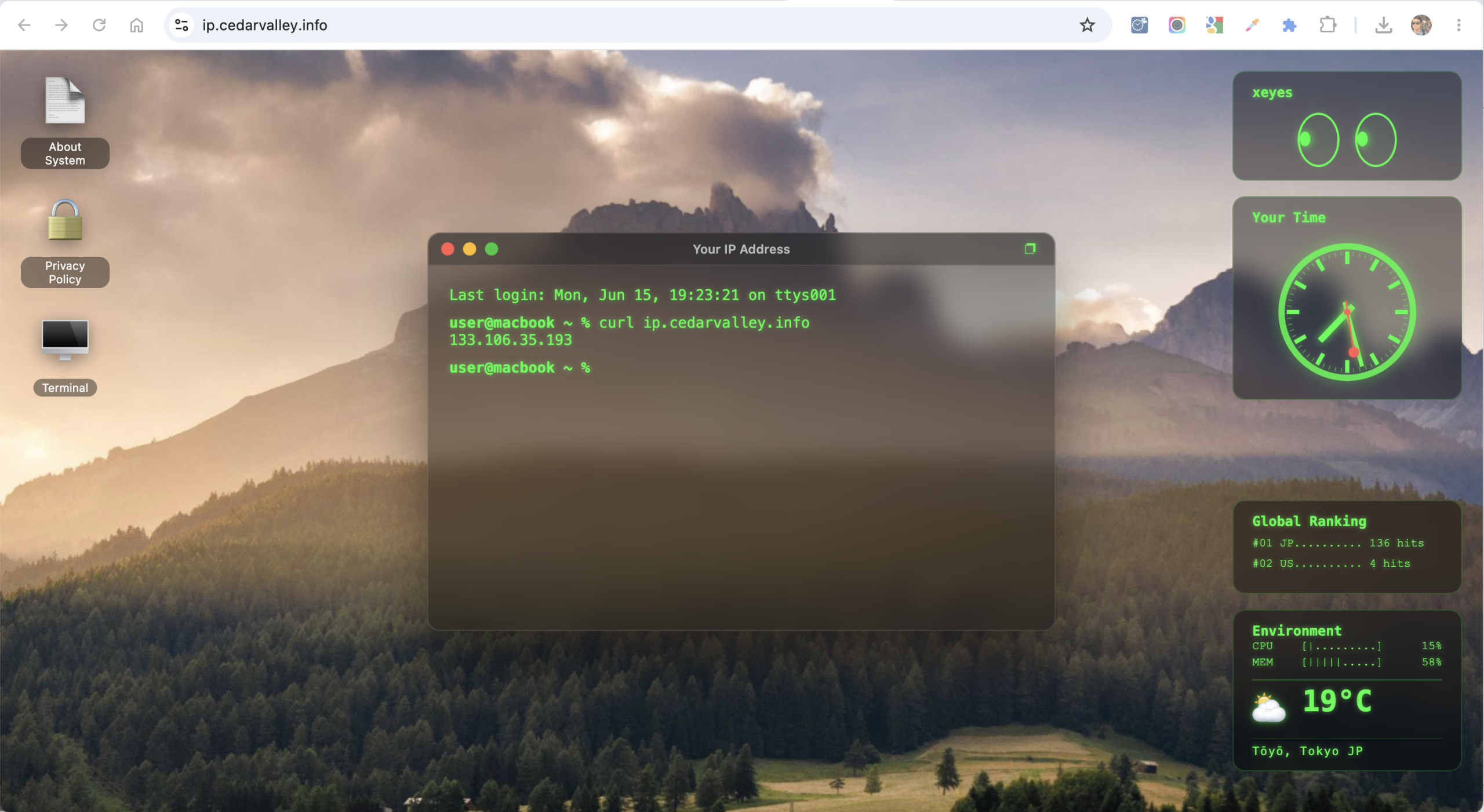
Unlike standard IP lookup websites, this application is designed as a web-based, glassmorphic desktop environment resembling a classic terminal OS. It combines responsive retro widgets—including a custom mathematical clock and cursor-tracking eyes—with on-the-fly geolocation lookup.
Here is a deep dive into the technology stack, mechanics, and how everything works under the hood.

The Technology Stack
To keep the application lightweight, lightning-fast, and responsive, I opted for a clean, vanilla-first approach with minimal external dependencies.
- Frontend:
- HTML5 & Vanilla CSS3: Custom-designed system using Glassmorphism (
backdrop-filter: blur()), CSS variables, flexible grid stacks, and micro-animations. Avoided Tailwind or styled UI kits to maintain complete control over alignment and render overhead. - Vanilla JavaScript (ES6+): Handles interactive window dragging, terminal emulation, canvas-less vector graphics, and API orchestration.
- HTML5 & Vanilla CSS3: Custom-designed system using Glassmorphism (
- Backend:
- Node.js & Express: A lightweight server responsible for hosting static assets and acting as an API gateway for detecting visitor IP addresses.
- Hosting & Infrastructure:
- Web Server: Node.js running behind an Nginx reverse proxy on Debian 12 (Bookworm).
- Hosting Provider: Hosted on Amazon Lightsail (located in the Tokyo region).
- CDN & Edge Security:
- Protected by a Cloudflare Global Proxy, which handles TLS termination, caching, and provides high-accuracy edge headers for incoming requests.
Core Operation: How IP Lookup & Geolocation Work
When a user visits the site, the lookup process is executed in real-time without storing any personal data:
- IP Detection at the Edge: The Express server parses headers from the proxy to retrieve the true client IP. It prioritize Cloudflare’s
cf-connecting-ip, falling back to standardx-forwarded-forproxy headers. - CDN Geolocation (Zero-Latency): Instead of using expensive, slow third-party geolocation lookup databases on the server, the application reads location headers passed by Cloudflare (
cf-ipcity,cf-ipcountry,cf-iplatitude,cf-iplongitude). - Fallback Details: If Cloudflare headers lack specific city or region data (which can happen on local testing or direct accesses), the frontend executes a client-side fallback query to a free geolocation API (
freeipapi.com). - Environment & Weather Sync: Using the latitude and longitude, the app dynamically requests the current weather from the Open-Meteo API (using latitude/longitude query params) to display local temperature and weather icons on the
Environmentstatus widget. - Interactive Mapping: When the user types
show mapinto the terminal window, the client uses the coordinates to render an image from the Yandex Static Maps API, complete with a green-neon stylized filter.
Emulating a Terminal in the Browser
The heart of the app is the Terminal window. It features:
- Initial Typing Animation: A recursive timeout function types out
curl ip.cedarvalley.infoto show users how to perform the lookup via command-line interface. - Native-Custom Hybrid Caret: The input area uses a
contenteditable="true"element. We styled the native caret to transparent and built a customized CSS blinking cursor to achieve a clean retro shell feel, with focus/blur listeners to prevent double-cursor overlaps. - Shell Command Parser: A custom JS command router processes shell inputs:
show ip: Prints your public IP.show map/close map: Displays or hides the geographical map window.date: Prints local client date and time zone.clear: Clears the screen buffer.help: Displays the list of available commands.
Cross-Fading Desktop Wallpaper Preloading
The high-quality desktop wallpapers that define the aesthetic of our terminal OS are randomly fetched every 15 seconds from Lorem Picsum. To prevent any loading flickers or blank background flashes, we implemented a double-layer cross-fading preloader using HTML, CSS, and JS:
- The script detects if the user is on mobile or desktop, dynamically generating image query URLs tailored to mobile (portrait
1080x1920) or desktop (landscape1920/1080) to optimize memory and bandwidth. - Images are preloaded asynchronously using a client-side
new Image()object onto the offscreen background layer. - Once the image is fully loaded (
img.onload), the script switches the.activeclass between the two layers. - A CSS
transition: opacity 4s ease-in-outrule kicks in, smoothly cross-fading the new wallpaper over the old one over a 4-second period.
Crafting the Desktop Widgets
We implemented two highly balanced, aesthetic widgets on the top-right stack:
The “Your Time” Clock (MONDAINE Inspired)
Replicating the iconic Swiss Railway (MONDAINE) clock design, the dial and hands are rendered using CSS and dynamically generated DOM elements:
- The Ticks: 60 ticks (12 thick hour ticks and 48 thin minute ticks) are generated dynamically in JS on load, positioned using absolute coordinates and rotated using a precise math-derived
transform-origin(offsets calculated against the 120px diameter circle). - The Hands: Hour, minute, and second hands feature Mondaine’s classic flat-ended rectangles.
- The Rote Kelle (Red Dot): The red second hand features the signature red circular dot at its tip. The rod height is designed to sit perfectly inside the clock dial, rotating smoothly via
requestAnimationFrameto ensure zero stutter.
xeyes (X11 Desktop Classic)
A tribute to the retro Unix utility:
- Captures global
mousemoveevents. - Calculates the angle and distance between the cursor and the center of both eyes using
Math.atan2(). - Constrains the green pupils dynamically within the boundaries of the elliptical sclera, scaling pupil displacement based on cursor distance to create a natural “looking at you” effect.
Privacy-First Architecture
Because this is a utility for developers and network engineers, privacy was treated as a core feature:
- No IP Storage: The server does not store IP addresses or geographical logs. Everything is processed purely in memory and returned to the client.
- Aggregated Access Count: To power the “Global Ranking” hit counter, we send the anonymized country code (e.g.,
JP,US) to a Google Apps Script endpoint. The script increments a global integer map by country, meaning we only store aggregate totals (e.g., Japan: 66 hits) rather than specific raw visit details.
Conclusion
By using vanilla technologies, static maps, and edge proxy parameters, the site delivers a rich, desktop-like environment with zero bundle bloat and sub-second load times. It’s a fun blend of Unix nostalgia, clean web standards, and modern privacy practices.
Feel free to open the terminal on the site and type help to explore the shell!